
Apple Creator Studio costs $12.99 a month or $129 a year in the US, and ₹399 a month or ₹3,999 a year in India. Apple's 27 October update adds an AI assistant to Keynote, Pages and Numbers and another one to Logic Pro. It also builds the MotionVFX effects library into Final Cut Pro and lets outside AI agents work inside your documents through something called MCP. Apple says the full update reaches subscribers in November, though a test version of the iWork assistant already showed up in a 22 October update. Keynote, Pages and Numbers stay free, but every new AI feature is for subscribers only, and the assistant works in "U.S. English only." And once you cancel, Apple says you need an active subscription to open your Final Cut Pro, Logic Pro or Pixelmator Pro projects, unless you buy the one-time Mac app. On price alone, this is one of the best deals in creative software, especially in India. What you are really signing up for, though, is a deal where your own project files stay tied to the bill.
I read Apple's press release, the Creator Studio pages for India and the US, four Apple support pages, Apple's privacy pages for Keynote and Pages, and the Creator Studio terms. I also read what editors and Mac users said on X, MacRumors, 9to5Mac, Hacker News and Quora. The update is real, and parts of it are very good. The fine print matters more than the features, though, so that is where this piece spends its time.
What Apple actually announced
In Apple's words, the new assistant in Keynote, Pages and Numbers is "built on Apple models and OpenAI." You can ask it in plain English to build or change slides, documents and spreadsheets. Logic Pro gets its own assistant, built on "a combination of Apple-built models and OpenAI." Final Cut Pro gets MotionVFX titles and effects built in. That matters because Apple bought MotionVFX, a Polish company of about 70 people, in March. Keynote also gets a new open file format called .keyx, which Apple says every user can benefit from. And Keynote, Pages and Numbers get MCP support, which lets outside AI agents read and edit your documents directly.
The limits are hiding in the fine print at the bottom of the press release.

The assistant needs an Apple Intelligence device running iOS 27, iPadOS 27 or macOS 27, and it is "available in U.S. English only." MCP needs macOS 27, which makes it a Mac-only feature. The updates themselves are "available on the App Store this November for free for existing subscribers."
The MKBHD post, and the maths behind it
The post that turned this into a story came from Marques Brownlee on the morning of the announcement. By the time I read it, it had nearly 393,000 views. "I just paid $400 once for Final Cut Pro and used it for a DECADE / but Apple has been slooooowly dripping more and more features behind the subscription version in Apple 'Creator Studio' / ... and I think they're finally about to get me to pay ($129/yr) with this latest update. MotionVFX built-in."
Read the last line closely, because the tone matters. The most famous Final Cut Pro user in the world is saying Apple has worn him down. He even names the exact thing that did it, which is the effects library Apple bought in March and is now using as a reason to subscribe.
One person in the replies asked whether Final Cut Pro ever cost $400. Final Cut Pro alone has cost $299.99 since 2011. Add Motion and Compressor and the total comes to $399.97, which matches his $400 for the full editing kit. Another reply, from matthew_knauff, did the maths that every Final Cut owner is now doing in their head: "$400 over a decade is $40 a year. The subscription is $1,290 for the same decade."
That maths is right for the US, but in India the picture flips the other way. One-time Final Cut Pro costs ₹29,900 on the Indian Mac App Store, which is close to the US dollar price. Creator Studio costs ₹3,999 a year, which is about a third of the dollar price. So in India, buying Final Cut Pro once costs the same as about 7.5 years of the full subscription. In the US, it costs the same as about 2.3 years. Logic Pro at ₹19,900 works out to five years of the subscription. Apple prices the one-time apps in India close to US prices and the subscription at Indian prices. That is a clear choice, and it pushes Indian creators toward renting much harder than it pushes Americans.
What "free" Keynote, Pages and Numbers means now
Apple's FAQ is clear on this point: "Yes. You can continue using Keynote, Pages, Numbers, and Freeform for free." That is true today, and I don't expect the basic apps to start charging. But "free" has been shrinking all year, and you should know how.
Since January, every new smart feature in these apps has been for subscribers only. That includes image generation, Generate Presentation, presenter notes, Magic Fill and now the assistant. In April, Appleosophy and MacTech reported that Apple removed the older free Mac versions of Pages, Keynote and Numbers from the Mac App Store. The only versions left are the new ones with the subscription built in. The Register reported in February that the free apps now show pop-ups suggesting an upgrade, including a "What's New" screen in Pages. And MacMost found that "documents using premium templates or Content Hub images will not open in older versions." That means a file you made while subscribed quietly depends on the subscription.
Then came 22 October, when Apple released an iWork update with a test version of the assistant. Shortly after, Pages, Keynote and Numbers disappeared from the App Store. MacRumors wrote that "it is not clear if the apps were removed intentionally, or if it is a bug." By 23 October the apps were back as version 15.4.2, with release notes that said "This update contains bug fixes and performance improvements." Apple has never explained what happened on those two days.
People who only use these three apps are the most annoyed, and they have a point. "I shouldn't have to pay for a movie editor and music production software to access magic fill in Numbers," wrote tomtad on MacRumors when the bundle launched. On 9to5Mac last week, the top comment, from Tim L, said: "These features sound useful but not $12.99 per month useful."
The line in Apple's FAQ that matters most
This is Apple's answer to the one question every subscriber should ask before paying. I took it from Apple's India page.
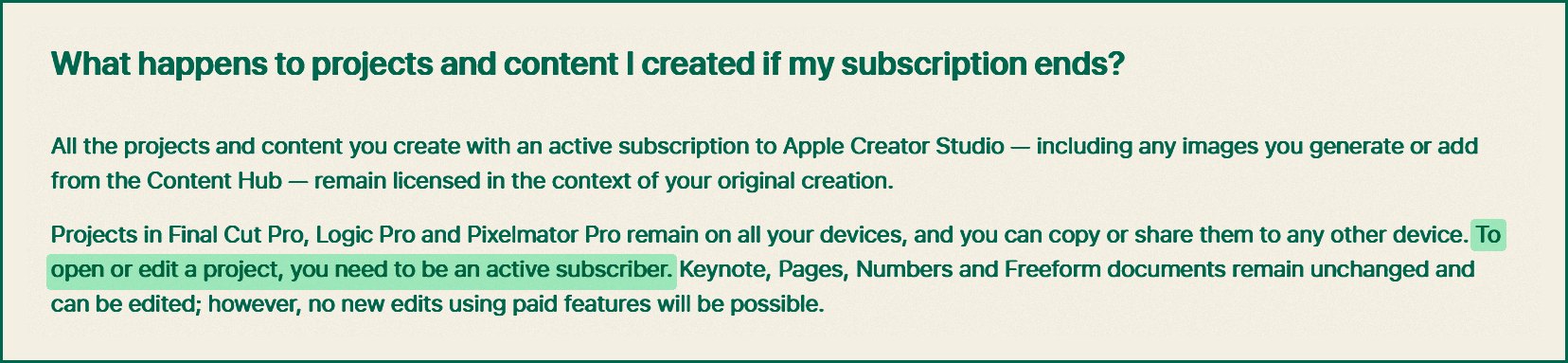
"Projects in Final Cut Pro, Logic Pro and Pixelmator Pro remain on all your devices, and you can copy or share them to any other device. To open or edit a project, you need to be an active subscriber." Apple's support page adds that you "retain access to the projects and files you created." It says you can "work on your projects if you decide to resubscribe later or if you want to buy an app that's available as a one-time purchase."
In plain words, your files belong to you, but the key that opens them is rented. On a Mac, you can buy the one-time app and get that key back. On an iPad alone you can't, because Final Cut Pro, Logic Pro and Pixelmator Pro for iPad are only sold through Creator Studio. Your way out is to move the project to a Mac and buy the one-time app there. Suraj Verma, an Indian user on X, flagged this on the day of the announcement. "Apple's FAQ says your projects stay on your devices if you cancel, but you need an active subscription to open..." he wrote, and he read it correctly.
The one-time Mac apps are not a full escape either. The standalone Pixelmator Pro has been stuck at version 3.8 since 9 April 2026, while subscribers are on version 4.4. MacMost says documents that use the new features "will not open in older versions." Apple's Final Cut Pro page says the one-time version "will continue to be updated." The same page also says "access to some of the premium content is available only to Apple Creator Studio subscribers." And Apple's Logic Pro page still says "Logic Pro and MainStage have all the same features whether they are subscription or one-time-purchase versions." It said that on the same day Apple announced a new Logic assistant for Creator Studio, and both of those things can't stay true for long.
So my callout is for Apple, and for Bryan O'Neil Hughes, Apple's director of worldwide product marketing for apps. In January, in remarks reported by t2online, he said of one-time buyers: "It'll update, and it'll all just work as you expect it to." He was talking about Final Cut Pro, and to be fair, one-time Final Cut Pro is on the same version number as the subscription version. But a one-time Pixelmator Pro frozen for more than six months is not what anyone expected from that promise, especially while subscribers get a new major version. Apple should publish one page that lists exactly which features the one-time apps will and won't get, and it should keep that page up to date.
Where your documents go when you use the AI
Apple sells itself on privacy, so this part deserves more attention than it has had. The assistant is built on "Apple models and OpenAI," but Apple has not published privacy terms for the assistant itself. What Apple has published, on its Keynote and Pages privacy pages, is how its older OpenAI features work. Your request "and attachments like contents of a presentation" are sent to OpenAI, and your IP address is hidden. OpenAI must "not store your information or any responses it provides unless required under applicable laws," and it "must not use your information to train its models." An assistant that reads your whole document to understand it will send a lot more than one short prompt.
There is also a second AI company in the mix that most coverage missed. Apple's support page on Creator Studio's smart features says Generate Image, Generate Shape and Generate Presenter Notes are now "powered by Google Cloud." Only Generate Presentation still runs on OpenAI. The French site MacG spotted this switch on 1 July. Yet Apple's Keynote and Pages privacy pages are still dated 2 April 2026, and they still name only OpenAI, with no mention of Google or the assistant. To be fair, Apple's support page does say these providers can't train on your data and don't store it. The problem is that the privacy pages Apple points careful users to are out of date.
MCP is the other new risk. Apple says outside agents can "read content, perform edits, and execute automated actions" in your documents. That is powerful, and MacStories managing editor John Voorhees called it "something that is sorely missing compared to similar apps from companies like Google." But researchers have warned about MCP since 2025, including a trick called prompt injection. That is when hidden text inside a document tells an AI agent to do something you never asked for. Apple has not published any rules for what an outside agent is allowed to touch. Steve Moser asked another open question on X: "I wonder if it requires an Apple Creator Studio subscription." So far, Apple hasn't answered that one either.
One line in the Creator Studio terms is worth knowing as well: "Output you get from artificial intelligence features may not be unique to you." So if you make a client's logo or a book cover with Apple's image tool, someone else can end up with something very close to it.
The India and language problem
For Indian users, the price is the best part of this deal. At ₹3,999 a year, Creator Studio costs less than Microsoft 365 Personal, which is ₹6,899 a year. It also costs about one-eighth of Adobe Creative Cloud Pro, which is listed at ₹2,714 a month. When it launched in January, Mukul Sharma (@stufflistings) told his followers, "I would honestly recommend that you at least get the trial." For anyone who edits video or photos on a Mac or iPad, that advice still holds.
But the main feature of this update is not built for most of India. The assistant is "available in U.S. English only," and Apple's own list of Apple Intelligence languages does not include Hindi. A student writing her project report in Hindi, or a shop owner making a Tamil price list in Numbers, gets nothing from the assistant. On 9to5Mac, a reader named Tom summed up the frustration: "I still can't believe Apple is still on the US-English-only train. Why?" The assistant also needs an Apple Intelligence device, which on the iPhone means an iPhone 15 Pro or newer.
The student plan has a catch you should know about before you sign up. At ₹199 a month or ₹1,999 a year, it is excellent value, but it is only for college and university students and teachers, not school students. Apple's support page says, "Once a year, Apple will ask you to reverify your status." If you don't, the plan "automatically renews as a standard Apple Creator Studio subscription." That doubles your price from ₹1,999 to ₹3,999 without you making any new choice.
"It's still far cheaper than Adobe, so what's the problem?"
This is the best argument for Apple, and much of it is true. Creator Studio gives you Final Cut Pro, Logic Pro, Pixelmator Pro, Motion, Compressor and MainStage, plus the iWork extras. You can use it on up to 10 devices and share it with up to five family members, all for less than a single Adobe app. John Gruber wrote in January that "Apple's pricing for Creator Studio is very fair," and he is right about that. AI features also cost money to run every time you use them, so it makes sense that they sit behind a subscription. Brian Petersen made the creator's case well in a reply to MKBHD. "I've spent less than $1k for Final Cut software since its earliest days and have used it to generate at least a million in revenue… Glad to subscribe now," he wrote.
I agree with all of that on price. My worry is about the two things the low price hides. The first is that the line keeps moving. Since January, Apple has put every new smart feature behind the subscription, pulled the old free iWork versions and frozen the one-time Pixelmator Pro. Gruber said this too, in the same post: "I don't think it makes sense to gate useful new features of these apps behind the Creator Studio subscription." The second is that your files become tied to the bill. With Adobe, nobody is confused about the fact that they are renting. With Apple, the free apps and the cheap price make it feel like you own something. That feeling lasts until you cancel and try to open a Final Cut Pro project on your iPad.
Not everyone has to accept this deal, and plenty of editors are already pointing at the way out. On Quora, Mike Lyons, a former software engineer at Sony Pictures Imageworks, wrote that he uses DaVinci Resolve because "even the paid version is a one-time purchase (not subscription)." Under MKBHD's post, TheMatsuXL wrote that if Apple keeps doing this, "ima switch to resolve." A cheap subscription with a fixed, published list of features would be easy to recommend. A cheap subscription where the free and one-time versions keep shrinking around it is a different deal. On Hacker News, acomjean described it in one line: "The price is a good deal, but you really are all in forever."
Who should pay, and who shouldn't
If you are a college student in India who edits video or makes music, take the ₹1,999 student plan. Set a calendar reminder for the yearly re-check, so the price doesn't jump to ₹3,999 on its own.
If you are a creator in India who uses Final Cut Pro or Logic Pro on a Mac, you should subscribe. Buying Final Cut Pro once costs as much as 7.5 years of the whole bundle. Keep exporting your finished videos and keep backups of your project files, since those are what you will need if you ever stop paying.
If you mostly edit on an iPad, know that there is no one-time Final Cut Pro, Logic Pro or Pixelmator Pro for the iPad. If you ever stop paying, your only way back into those projects is a Mac with the one-time app. That works because Final Cut Pro for Mac can import iPad projects.
If you already own Final Cut Pro or Logic Pro outright, as MKBHD does, keep that copy installed no matter what. Subscribe in the months when you need MotionVFX or the assistant, and cancel when you don't, because your one-time app will still open your projects.
If you only use Keynote, Pages and Numbers, don't pay for this. Templates and a U.S. English assistant are not worth ₹3,999 a year for most people, and the free apps still do everything they did before.
My prediction
When Apple's November update ships, the one-time Mac version of Final Cut Pro will not get the MotionVFX effects library. If the release notes for the one-time Final Cut Pro on the Mac App Store list the MotionVFX content, I was wrong, and I will update this piece.
MacRumors has reported that the one-time versions "will receive the new features in November," so this is a clean test. I am betting against MacRumors for three reasons. Apple's own Final Cut Pro FAQ says premium content is for subscribers, and the press release presents every new feature as a Creator Studio update. On top of that, the one-time Pixelmator Pro has already been left behind for six months.
Questions people are asking
How much does Apple Creator Studio cost in India? It costs ₹399 a month or ₹3,999 a year. Verified college students and teachers pay ₹199 a month or ₹1,999 a year. New subscribers get one month free, and people who buy a new Mac or a qualifying iPad get three months free.
Are Pages, Keynote and Numbers still free? Yes, all three are still free to download and use. The subscription adds premium templates, the Content Hub library of images and graphics, and all the smart features, including the new assistant.
Is Apple Creator Studio worth it? For anyone who uses Final Cut Pro, Logic Pro or Pixelmator Pro, especially in India, the price is very good. For anyone who only uses Keynote, Pages and Numbers, it isn't worth it, and the assistant only works in U.S. English.
What happens if I cancel Apple Creator Studio? Your files stay on your devices. To open Final Cut Pro, Logic Pro or Pixelmator Pro projects again, you need to subscribe again or buy the one-time Mac app. Your iWork documents still open and can be edited, just without the paid features.
Can I still buy Final Cut Pro once? Yes, on the Mac you can. It costs $299.99 in the US and ₹29,900 in India. Apple says some premium content is only for subscribers, and there is no one-time Final Cut Pro for iPad.
When does the new AI assistant arrive? A test version of the Keynote, Pages and Numbers assistant appeared in the 22 October iWork update. Apple says the full Creator Studio update, including the Logic Pro assistant, MotionVFX and MCP, reaches subscribers in November. It needs an Apple Intelligence device on iOS 27, iPadOS 27 or macOS 27, and it works in U.S. English only.
Sources
- Apple Newsroom, 'Apple Creator Studio adds powerful new AI features and even more creative tools', 27 Oct 2026:apple.com/newsroom/…
- Apple Newsroom, Creator Studio launch, 13 Jan 2026:apple.com/newsroom/…
- Apple, Creator Studio page (India):apple.com/in/…
- Apple, Creator Studio page (US):apple.com/apple-creator-studio
- Apple Support, About Apple Creator Studio (125029):support.apple.com/en-us/…
- Apple Support, intelligence features in Creator Studio (127888):support.apple.com/en-us/…
- Apple Support, education subscription (126312):support.apple.com/en-us/…
- Apple Support, Apple Intelligence languages (121115):support.apple.com/en-in/…
- Apple, Keynote & Privacy:apple.com/legal/…
- Apple, Creator Studio Terms:apple.com/legal/…
- Apple, Final Cut Pro FAQ:apple.com/final-cut-pro
- Apple, Logic Pro FAQ:apple.com/logic-pro
- MKBHD on X, 27 Oct 2026:x.com/MKBHD/…
- MacRumors, Creator Studio update, 27 Oct 2026:macrumors.com/2026/…
- MacRumors, iWork apps pulled from App Store, 22 Oct 2026:macrumors.com/2026/…
- 9to5Mac, iWork assistant release notes, 22 Oct 2026:9to5mac.com/2026/…
- Cult of Mac, 23 Oct 2026:cultofmac.com/news/…
- MacStories, 27 Oct 2026:macstories.net/news/…
- MacG, image generation moves to Google Cloud, 1 Jul 2026:macg.co/intelligence-artificielle/…
- MacMost, Creator Studio backward compatibility:macmost.com/is-apple-creator-studio-backwards-compatible.html
- Appleosophy, older iWork versions pulled, 13 Apr 2026:appleosophy.com/2026/…
- MacTech, old free iWork apps removed, 12 May 2026:mactech.com/2026/…
- Ars Technica, how Creator Studio subscriptions work (10 devices), 28 Jan 2026:arstechnica.com/gadgets/…
- MacRumors, Creator Studio exclusive features, 13 Jan 2026:macrumors.com/2026/…
- Apple, Pages & Privacy:apple.com/legal/…
- Apple Support, import Final Cut Pro for iPad projects on Mac:support.apple.com/guide/…
- Wikipedia, Model Context Protocol (security concerns):en.wikipedia.org/wiki/…
- The Register, upsell prompts in iWork, 11 Feb 2026:theregister.com/2026/…
- t2online, Bryan O'Neil Hughes interview, 28 Jan 2026:t2online.in/tech/…
- Notes from Poland, Apple acquires MotionVFX, 17 Mar 2026:notesfrompoland.com/2026/…
- Daring Fireball, John Gruber on Creator Studio, Jan 2026:daringfireball.net/2026/…
- Adobe Creative Cloud plans (India):adobe.com/in/…
- Microsoft 365 plans (India):microsoft.com/en-in/…
- Blackmagic Design, DaVinci Resolve:blackmagicdesign.com/products/…
- MacRumors forum, 27 Oct 2026:forums.macrumors.com/threads/…
- Hacker News, Apple Creator Studio launch thread:news.ycombinator.com/item
- Quora, Mike Lyons on DaVinci Resolve as a one-time purchase, Jan 2026:quora.com/Which-video-editing-software-should-YouTubers-choose-in-2026-for-fastest-growth-Premiere-Pro-DaVinci-Resolve-or-Final-Cut-Pro